Customers
The details you need, when you need them.
Keep contacts, notes and service history close. Call, text or find directions through your device.
 kobita.
Business management, together
Your customers, quotes, jobs and team plans, together. Less chasing details. More room to run the business you are building.
We will never sell your data or your customers’ data.
There’s an Android version, too. iOS is in the works.

Real product workflows, illustrated with fictional data.
Made for the people who keep homes, businesses, and communities running.
The product
For the days when the phone rings, a job changes and everyone needs the latest plan.
Customers
Keep contacts, notes and service history close. Call, text or find directions through your device.
Services and quotes
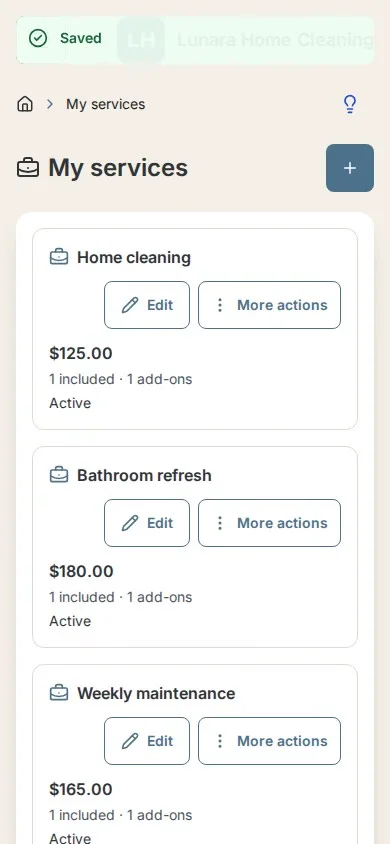
Build services with optional extras, or quote custom work. Saved quotes keep their own scope and prices.
Jobs and schedules
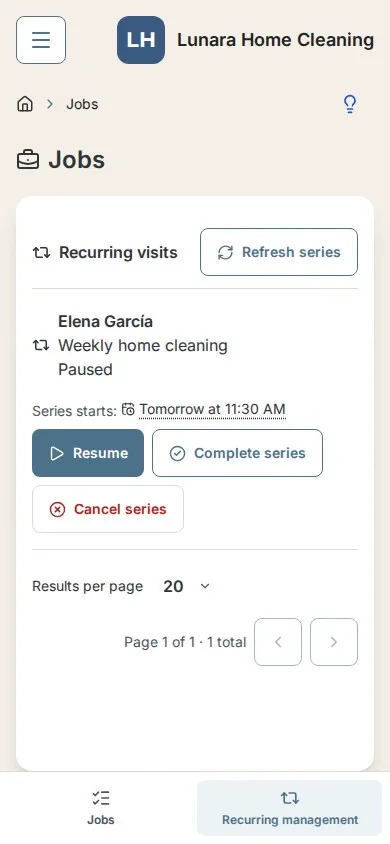
Plan visits, adjust active jobs and keep daily team agendas clear. Plus, Pro and Elite include Google Calendar sync (one-way) by subscription link.
Product tour
Short walkthroughs from the actual app. Choose what matters to your working day.
See the complete tourStart where you are
Start with your customers, add your services and plan your next job. Bring existing customer records in with an import instead of typing every name again.
Review your customer file and choose what to import.
Set a base price and add optional included items or extras.
Keep the customer, work and schedule together.
Importing is part of setup, not a promise of assisted importing or automatic messaging consent.
Product preview
These features are implemented in the local preview. Production availability has not been confirmed. The product tour includes fictional demonstrations of these workflows.
Owner-only reports and CSV export are included on every plan in the implemented preview. Large totals show the count and amount for the full selected period, with currencies kept separate.
Completed and paid jobs by week, month or year, custom date ranges, outstanding balances, upcoming workload, top customers, monthly trends and quote conversion.
Record a full job settlement with an amount and date, independently of completion. Linked nonvoid invoices synchronize with the receipt. These are manual records, not bank-verified payments; partial payments and refunds are not included.
Quick filters bring unpaid invoices and incomplete jobs into view.
Plus, Pro and Elite can save up to ten HTTPS links with predefined platform names in Business Settings, with separate switches for customer request forms and mini websites. Mini websites still require Pro or Elite.
Enabled social links appear in a footer below a divider on customer request pages and mini websites, using the same platform colors as the selector. Empty or hidden lists show no social footer.
Request-form changes apply after saving. Website additions and edits follow review and publication; the published links remain until the replacement is approved. Disabling display or losing plan eligibility hides public links immediately.
Use your own Cash App account and enter the correct username. Kobita only shares an external link; payments happen directly through Cash App. Kobita does not process or verify payments.
Mini website link and QR: eligible Pro/Elite plans, opt-in and approval. Notifications depend on plan and messaging settings.
Cash App is a trademark of Block, Inc. Kobita is not affiliated with or endorsed by Cash App.
App feature preview. Public availability is not yet confirmed.
Plans for your business
Monthly pricing in USD. SMS and other optional services depend on your plan, consent and configured delivery.
We will never sell your data or your customers’ data.
Free
$0/ month
Your starting point
Plus
$9.99/ month
Adds to the previous plan
Pro
$19.99/ month
Choose this plan during account setup.
Adds to the previous plan
Elite
$29.99/ month
Choose this plan during account setup.
Adds to the previous plan
* SMS is limited to predefined updates. Customer consent, enabled delivery and available segments are required. No regular text conversations or custom message composer.
SMS allowances: Plus 250, Pro 550 and Elite 1,200 segments per billing period. A message can use more than one segment. Availability and provider checks apply.
SMS content and conditionsQuestions
The implemented preview includes owner-only reports and CSV export on Free, Plus, Pro and Elite. Owners can record a full job settlement independently of completion; linked nonvoid invoices synchronize with that receipt. These are manual records, not bank-verified payments. Partial payments and refunds are not included. Production availability has not been confirmed.
In the implemented preview, Plus and higher can save up to ten HTTPS links with predefined platform names in Business Settings and choose request-form and website visibility separately. Enabled links appear in a footer below a divider, with the platform colors shown in the selector. Empty or hidden lists show no social footer. Request-form changes apply after saving. Mini websites still require Pro or Elite, and additions or edits need review and publication; the published links remain until a replacement is approved. Disabling display or losing plan eligibility hides links immediately. Production availability has not been confirmed.
Kobita has an Android version, and an iOS version is in the works. You can also use Kobita in your web browser.
We will never sell your data or your customers’ data. Necessary service providers may process information to operate Kobita, as explained in our privacy notices.
Yes. Services are optional starting points. Quotes and jobs can include custom work, with their own saved scope and pricing.
No. A customer can approve the quoted agreement. You create and schedule the job separately. Quote links are not customer portal access or verified electronic signatures.
Pro and Elite add a business website. Owners submit a complete language, five to ten gallery photos and publishing terms acceptance for human review. The review target is 24 hours. Approval is not guaranteed.
Pro adds private daily team agendas. Elite also lets eligible team leaders send predefined customer updates from those agendas, subject to consent and delivery checks.
Plus, Pro and Elite support a one-way subscription from Kobita to Google Calendar. The owner creates a secret link from Schedule or Business Settings, then adds it in desktop Google Calendar under Other calendars → From URL. Google controls refresh timing, so changes may be delayed; edits in Google do not update Kobita. Owners can replace or revoke the link. Anyone with the link can read job titles, times and statuses; downloaded events cannot be recalled.
Kobita does not currently provide regular text conversations, a custom message composer or general purpose SMS messaging. Users cannot write arbitrary messages for Kobita to send.
Optional services depend on plan eligibility and configured providers. SMS also requires customer consent and available segments. Native app availability depends on the platform release. Recordings use fictional data and simulated delivery.
The implemented preview includes logo uploads and a monogram creator on every plan. Choose initials, fonts, solid or gradient backgrounds, and separate light or dark lettering. New documents use current branding; Free invoices also carry Kobita attribution, while paid plans omit it. Production rollout has not been confirmed.
Talk to us
Questions about Kobita or getting started? We would like to hear them. This is a contact form, not a mailing list.
hello@kobita.appPlease leave out passwords, access codes, payment details and private customer information.
Website privacy